

 Aug 08,2026
  By Muhammad Raza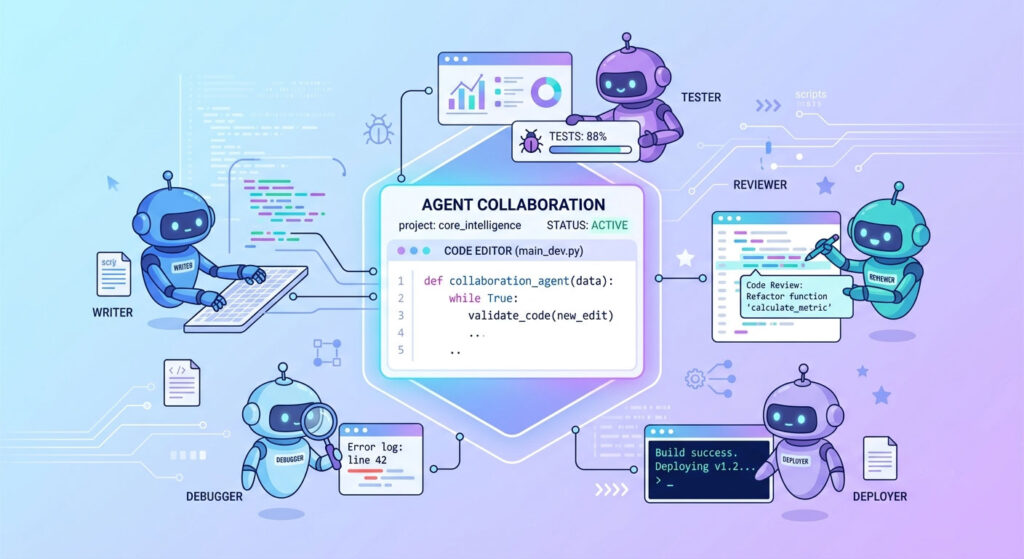
Table of Contents
What Is Agentic AI? A Practical Guide for Businesses and Developers
Agentic AI is AI that can take a task, work out the steps needed to complete it, and then carry out those steps. Instead of only answering a question, an AI agent can use tools, inspect results, make decisions, and continue working toward a goal — with a human reviewing the important results.
That last part matters. In real software development, I wouldn’t let an agent make production changes without review. Agents are useful, but they still make mistakes.
How is agentic AI different from regular AI?
A normal AI chatbot usually works like this:
You ask → AI answers → You decide what to do next.
An agent works more like this:
You give it a goal → AI plans the work → AI uses tools → AI checks what happened → AI continues or asks for help → You review the result.
For example, you could ask a coding agent:
“Add a customer notification system to the Laravel application. Send an email when an order is completed, add tests, and update the documentation.”
A basic chatbot might give you example code.
An agent can potentially inspect the existing Laravel project, find the relevant order logic, identify the mail system already being used, create the required files, write tests, run those tests, inspect errors, make corrections, and prepare the changes for review.
That’s the useful difference.
The agent isn’t just generating text. It’s working with the project.
How does an AI agent actually work?
Most useful agents follow a fairly simple loop.
- Understand the goal
- Break the task into smaller steps
- Inspect the available information
- Use tools to perform actions
- Check the results
- Correct problems when possible
- Stop and ask a human when necessary
The tools are what make this interesting.
An agent might have access to a code repository, terminal, browser, database, APIs, project management software, or testing tools. The exact setup depends on the job.
For a developer, this means the agent can move beyond “write me some PHP” and actually interact with the application it’s working on.
What does agentic AI look like in software development?
Here’s a workflow I can actually see being useful in a development team.
Imagine a business wants a new feature added to its e-commerce website.
The request is:
“Add a customer wishlist feature. Customers should be able to add and remove products and see their saved products from their account.”
Instead of starting from an empty chat window, the developer gives the coding agent access to the project.
The agent first inspects the application.
It might identify:
- The Laravel version
- Existing product and customer models
- Authentication logic
- Database structure
- Existing API routes
- Frontend components
- Testing conventions
- Existing coding patterns
Then it creates a plan.
For example:
Step 1: Create the wishlist database table.
Step 2: Add the model and relationships.
Step 3: Add API endpoints.
Step 4: Add frontend controls.
Step 5: Add tests.
Step 6: Run the test suite.
Step 7: Review the resulting changes.
The agent then starts implementing the feature.
If a test fails because the existing application uses a different relationship structure, the agent can inspect the error and attempt a correction.
Once the work is finished, the developer reviews the code.
The developer checks the database migration, API security, authorization, frontend behavior, tests, and overall code quality.
If everything looks right, the developer merges the changes.
That’s a much more realistic view of agentic AI than saying, “AI builds your entire application for you.”
It doesn’t.
It helps a developer get the work done faster.
Why does human review still matter?
This is where some AI discussions get too optimistic.
An agent can make a perfectly reasonable-looking mistake.
It might misunderstand a business rule. It might modify the wrong part of an application. It might write a test that passes but doesn’t actually test the important behavior.
I’ve found that the dangerous part isn’t necessarily an obvious error. It’s code that looks correct at first glance.
A developer still needs to understand the system and review important changes.
For production software, I’d treat an AI agent more like a junior developer who can work very quickly. Give it clear tasks. Give it access to the right tools. Review what it produces.
That’s a much safer mental model.
Agentic AI vs traditional AI: what’s the difference?
| Traditional AI | Agentic AI |
|---|---|
| Answers questions | Works toward a defined goal |
| Mostly produces text or code | Can use tools and perform actions |
| Usually waits for the next prompt | Can continue through multiple steps |
| Limited context about the project | Can inspect project files and systems |
| Human performs the actions | Agent can perform approved actions |
| Usually one response at a time | Can operate through a task workflow |
The distinction isn’t that one is “smart” and the other isn’t.
It’s about how much work the system can perform on its own.
Where can businesses use agentic AI?
Software development is only one example.
A business could use agents for internal workflows such as reviewing incoming support requests, checking information across different systems, preparing reports, or assisting with repetitive research.
For a website or e-commerce business, an agent might help with tasks such as:
- Checking product data for missing information
- Reviewing website content
- Preparing SEO recommendations
- Monitoring selected website errors
- Summarizing customer support requests
- Creating development tickets from reported bugs
- Checking changes against predefined requirements
The useful question isn’t “Where can we put AI?”
It’s:
Which repetitive task currently requires a person to gather information, make several decisions, and perform a predictable sequence of actions?
That’s where an agent may make sense.
What are the limitations of agentic AI?
There are several.
Agents can misunderstand instructions.
A vague requirement can produce a technically correct solution that doesn’t solve the actual business problem.
Agents can make incorrect assumptions.
If your existing application has undocumented behavior, an agent may not know why something was built a certain way.
Agents can introduce bugs.
More automation doesn’t remove the need for testing.
Agents need appropriate access.
Giving an agent unrestricted access to production systems is a bad idea. Permissions should match the task.
Agents can waste time.
Sometimes an agent takes several attempts to solve something a developer could fix in ten minutes.
This is why I prefer controlled workflows. Let the agent inspect, build, test, and prepare changes. Keep sensitive decisions and production deployment behind human approval.
What does agentic AI mean for your business or website?
For a business owner, you don’t need to start by building a complicated AI system.
Start with one workflow.
Look at a process your team repeats every week. Maybe it’s processing support requests, checking product information, preparing reports, or turning development requests into working code.
Then ask three questions:
- Can the task be clearly described?
- Can the required tools and data be accessed safely?
- Can a person review the result before anything important happens?
If the answer is yes, an AI agent could potentially handle a meaningful part of that workflow.
For website and software projects, this can also change how development teams work. Instead of developers spending as much time on repetitive implementation, they can spend more time reviewing architecture, business requirements, security, and the parts of the system that actually require experience.
For businesses considering AI automation or custom development, this is also where a proper technical assessment helps.
Frequently asked questions
Is agentic AI fully autonomous?
Not necessarily. An agent can perform multiple steps without someone manually instructing every action, but important workflows should still have human approval and appropriate access controls.
Can agentic AI replace developers?
It can automate parts of development, but replacing the developer entirely is a different claim. Developers still need to understand requirements, architecture, security, testing, and whether the solution actually makes sense for the business.
Is agentic AI useful for small businesses?
Yes, if it’s applied to a specific repetitive workflow. A small business doesn’t need a huge AI platform to benefit. One well-designed workflow that saves several hours every week can be enough to justify it.